Solver comparison
easycaptcha vs NoneCap: hCaptcha integration comparison
Compare easycaptcha and NoneCap by integration shape, recognition versus tokens, billing units, extension use, and the outcomes to measure in your own flow.
By the easycaptcha team · Published
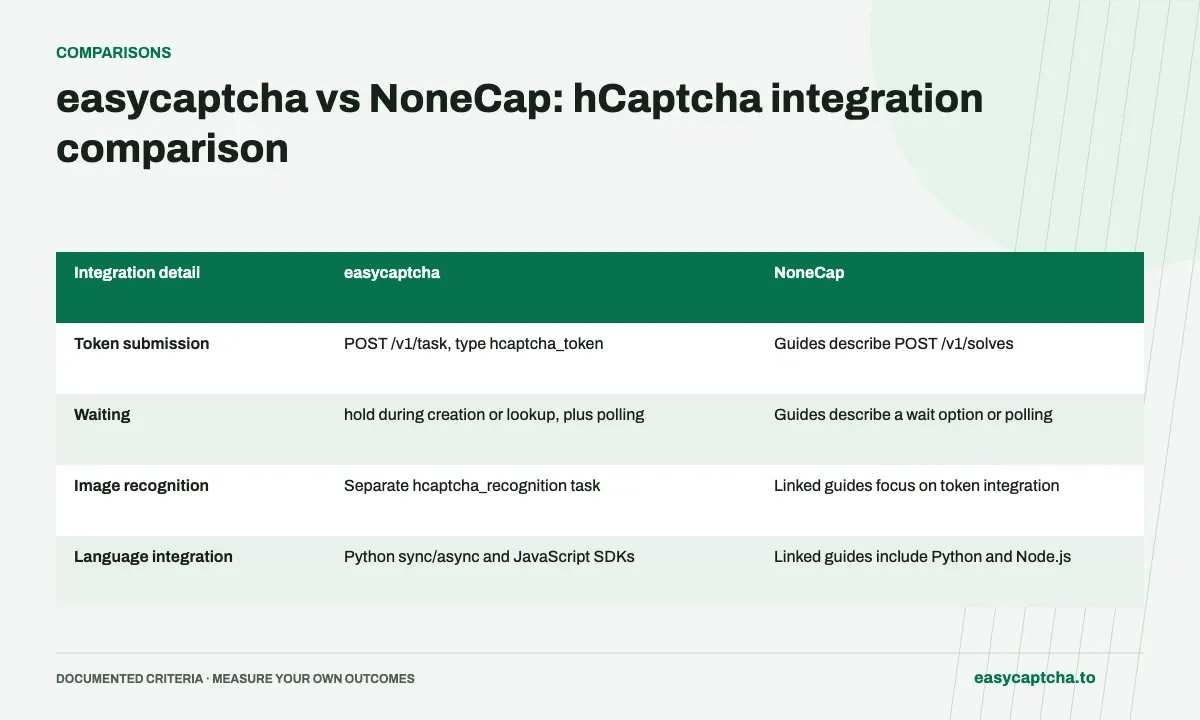
Both products offer an hCaptcha-solving integration, but a useful comparison begins with the result your application consumes. NoneCap’s integration guides describe returning tokens through a submit-and-poll flow. easycaptcha provides token tasks and a separate recognition API used by its Chromium extension.
Integration scope
This comparison is written by the easycaptcha team. It compares published integration details, not a controlled performance benchmark. Check the linked vendor documentation when making a decision; support and commercial terms can change.
Compare the public task contract
| Integration detail | easycaptcha | NoneCap |
|---|---|---|
| Token submission | POST /v1/task, type hcaptcha_token |
Guides describe POST /v1/solves |
| Waiting | hold during creation or lookup, plus polling |
Guides describe a wait option or polling |
| Image recognition | Separate hcaptcha_recognition task |
Linked guides focus on token integration |
| Language integration | Python sync/async and JavaScript SDKs | Linked guides include Python and Node.js |
The NoneCap column summarizes its published guides. A feature not described there should not be interpreted as a confirmed absence. Validate the actual request fields, enterprise requirements, and result format for your integration.
Compare units before prices
A price per recognition group is not a price per returned token. easycaptcha lists separate rates for recognition, regular tokens, and enterprise tokens on its pricing page. The free extension plan covers 25 recognition groups per day, not an equivalent number of token API jobs.
For any vendor, write down what a billed unit means. Then estimate the workload you will actually submit: task type, groups per challenge, concurrency, and any premium mode. Comparing headline numbers without the unit can favor a service that is simply selling a different operation.
Try the relevant path first
For browser assistance, begin with the easycaptcha extension guide. For an application consuming tokens, start with the Python or JavaScript example. If your workload requires enterprise requests, confirm access and the required data before treating a regular-token evaluation as representative.
Use a small evaluation with the same application flow and record task completion, observed acceptance, latency, and final application outcome. Keep unknown results in the report. Neither this table nor a vendor’s marketing page establishes how a specific sitekey will behave.
Decide using an application-level result
Choose the service whose supported operation, recovery behavior, and billing model fit your integration. If you need both recognition and tokens, evaluate both paths. If you only need a token, judge the complete token workflow rather than extension features you will not use.
Our measurement guide provides a cohort and denominator model you can use for either service. Keep the actual test report separate from published feature comparisons so future documentation changes do not erase what you measured.
Frequently asked questions
What should an easycaptcha versus NoneCap comparison start with?
Start with the integration you need: browser assistance, recognition results, or tokens. Then compare the documented contract for that workload.
Does this article establish a solver speed or accuracy ranking?
No. It compares integration details. Measure providers on a representative workload before making performance claims.
How can I evaluate easycaptcha on my own workload?
Start with a small integration trial using representative hCaptcha tasks. Compare observed acceptance, final outcomes, and costs in the actual billing unit rather than relying on a feature table alone.